On-page visual feedback for web teams via Chrome extension
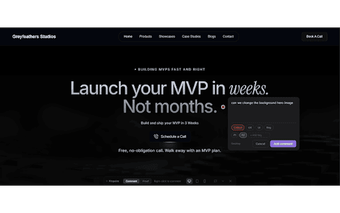
Droppnotes - Visual Feedback, from Grey Feathers, is a Chrome extension that replaces long email threads with on-page annotations for website reviews. Reviewers can drop pins anywhere on live or staging sites and each comment is paired with an automatic screenshot to show the exact visual state. The extension includes project labels, statuses, threaded discussions, voting, Slack notifications and a Proof mode for verification. Web agencies, freelance developers and QA teams obtain clearer, faster guidance during design and bug reviews.
What is Droppnotes used for?
Droppnotes converts vague review threads into anchored, on-page comments by letting reviewers drop a pin anywhere on a live or staging site; each comment is paired with an automatic screenshot to show the exact visual state. This design makes it practical for web agencies and freelance developers who need precise visual context when reporting layout, styling or interaction issues during design and QA passes.
How does it fit into team workflows?
Droppnotes includes project labels, statuses and threaded discussions to help teams track progress. It supports voting to prioritize comments and connects to Slack for real-time notifications. Collaboration elements include:
- Labels and statuses: Open, Done, Resolved
- Threaded discussions and voting
- Slack integration for instant alerts
Those features align with agency review workflows and client handoffs.
How are fixes verified and approved?
Droppnotes provides a Proof mode that captures a screenshot for confirming completed fixes, giving a dedicated verification step. Teams can invite clients and teammates to specific projects so stakeholders can view and annotate the same pins. The extension supports any URL, including local and staging environments, so teams can verify work in development previews and capture pre-production states before deployment.
How simple is setup and who can use it?
Droppnotes installs as a Chrome extension and uses a zero-script approach, so reviewers can start annotating sites without modifying page source or deploying helper tags. The extension is available for Chrome on Windows, macOS and Linux, which speeds adoption for Chrome-centric teams. However, teams or clients using non-Chrome browsers cannot run the extension in their native browser, restricting participation to Chrome users.
Best suited to Chrome-based teams that need clearer visual review channels
Droppnotes is a practical option for web agencies, freelance developers and QA teams because users report it reduces time spent on back-and-forth communication and is easy to use. Treat the extension as the project's single source for visual feedback and invite stakeholders early to consolidate comments. Expect clearer review threads and faster sign-off cycles rather than a change in development workflows.